
Mastering Google search operators for eCommerce
Has your eCommerce business benefited from Google Search Operators? If not, you could be losing out on easy ways to find indexing issues on your website, locate key content for improvement, or conduct competitor research. Not to worry - we’ve put together a full explanation and key list of what Google Search Operators are and how they can help bolster your site.
What are Google search operators?
Google Search Operators are special commands you can put into Google that can refine and enhance its search results. They help users narrow down searches, which is particularly useful if you’re looking for something specific about a site. Google can do all this using a structure of key phrases and symbols to pinpoint what you need.
For example:
-
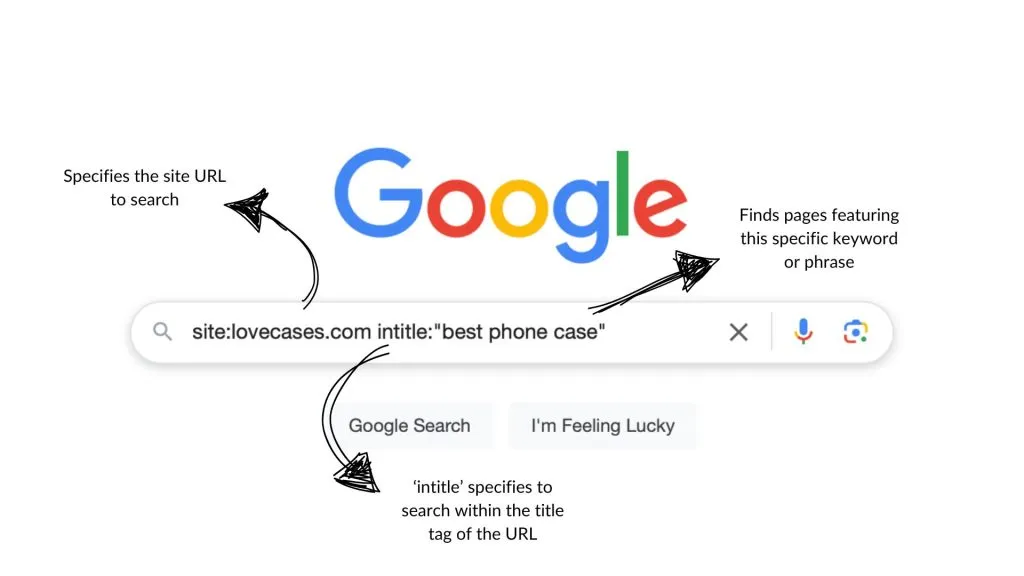
site:lovecases.com - Shows results only from the specific site, lovecases.com
-
Intitle:”best phone case” - Finds pages with the exact phrase in the title.
-
∫ - Excludes a specific word from results.
We’ll dive into a more comprehensive list of advanced Google Search Operators and how to use them in just a moment. But first, it’s important to understand how they can help you.
How advanced Google search operators can help your eCommerce business
Google Search Operators can be a game-changer for eCommerce businesses, helping with things like SEO, competitor analysis and content optimisation.
For example, imagine you’d like to check what pages of your website are indexed in Google - a difficulty, right? Well, by putting the Google Search Operator tag site:yourstore.com into the Google search field, you can check what pages aren’t indexed in the results, making sure you can then submit them in Google Search Console.
Another example could be you wanting to improve the SEO of your website. You can first use something like site:lovecases.com to search the site in question, then intitle:”best phone case” to view what product pages have optimised title tags. This will help you identify what tags can be improved and boost your search engine rankings.
There are plenty of ways to use Google Search Operators, but the key is knowing what is available to use and how. Luckily, we’ve put together a handy ‘cheat sheet’ that you can use, breaking down why each one is useful to your eCommerce business.
Google search operators cheat sheet
Here are just some key examples of advanced Google Search Operators that can help in eCommerce…
site: find indexed pages
Example: site:lovecases.com
Purpose: Creates a search query for all pages of that site URL, such as lovecases.com.
Why It’s Useful: This is great for helping site operators and marketers make sure that key pages are appearing in search results. By starting a search query with this Google Search Operator, you can then follow it up with what you’d like to search for within those pages (more on this below). Additionally, if important pages are missing, this query might indicate indexing issues that need to be addressed through better SEO practices.
intitle: find pages with specific keywords in titles
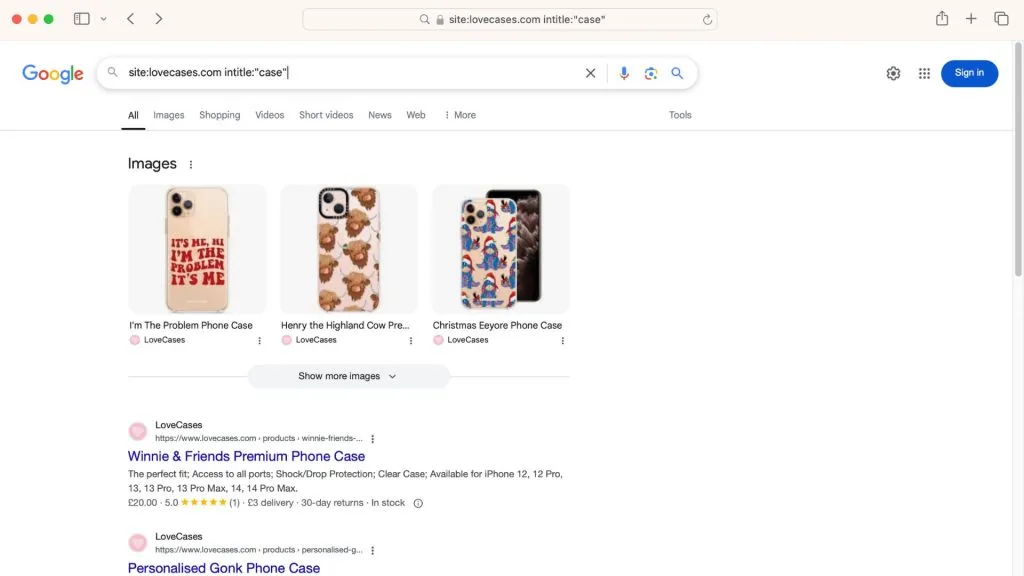
Example: site:lovecases.com intitle:“case”
Purpose: Finds pages with a specific keyword in the title on lovecases.com.
Why It’s Useful: Enables marketers to check whether specific products have optimised title tags, such as ‘case’, so they appear correctly in search results. If a high-priority keyword isn’t appearing in enough title tags, it may be worth revisiting SEO strategies to improve rankings.
inurl: identify URL structures
Example: site:lovecases.com inurl:“collections”
Purpose: Limits search results to URLs containing a specific keyword, such as ‘collections’.
Why It’s Useful: Helps locate all pages containing your chosen keyword in the URL, such as ‘collections’ with Shopify. This example keyword may be useful for showing your category pages if they are labelled as such, allowing you to assess URL structure, duplicate content risks, and ensure URLs are optimised for search as best as possible.
filetype: find PDFs and other files
Example: site:lovecases.com filetype:pdf
Purpose: Locates indexed files of a specific format on your website, such as PDFs.
Why It’s Useful: If your eCommerce store uses downloadable guides, press releases, or resources, this operator helps identify indexed files (such as PDFs). This is useful for tracking visibility and ensuring these assets are optimised with proper meta information.
cache: view Google’s cached version of a page
Example: cache:lovecases.com
Purpose: Displays Google’s last cached version of a webpage.
Why It’s Useful: Shows the last time Google crawled your page and allows comparison between cached and live versions of the site. Checking the cache is useful for eCommerce marketers to see if recent updates to the site, such as a promotional banner or new product pages, have been reflected in Google’s cache. A delay in updates may mean there are indexing delays or something more, meaning there might be need for further optimisation.
related: discover competitor sites
Example: related:lovecases.com
Purpose: Finds websites similar to a given domain.
Why It’s Useful: Identifies competitors or industry-adjacent brands to your eCommerce website. This is great for seeing what potential competitors are putting out and what content can help inspire future strategies.
“Keyword” exact match searches
Example: “pastel phone case” site:lovecases.com
Purpose: Forces Google to show results with the exact phrase.
Why It’s Useful: Helps check if specific keywords appear on product pages or blog content, such as ‘pastel phone case’. This is useful if you need to check that the phrase appears in page content for SEO purposes or to help keep messaging consistency.
-keyword exclude specific words
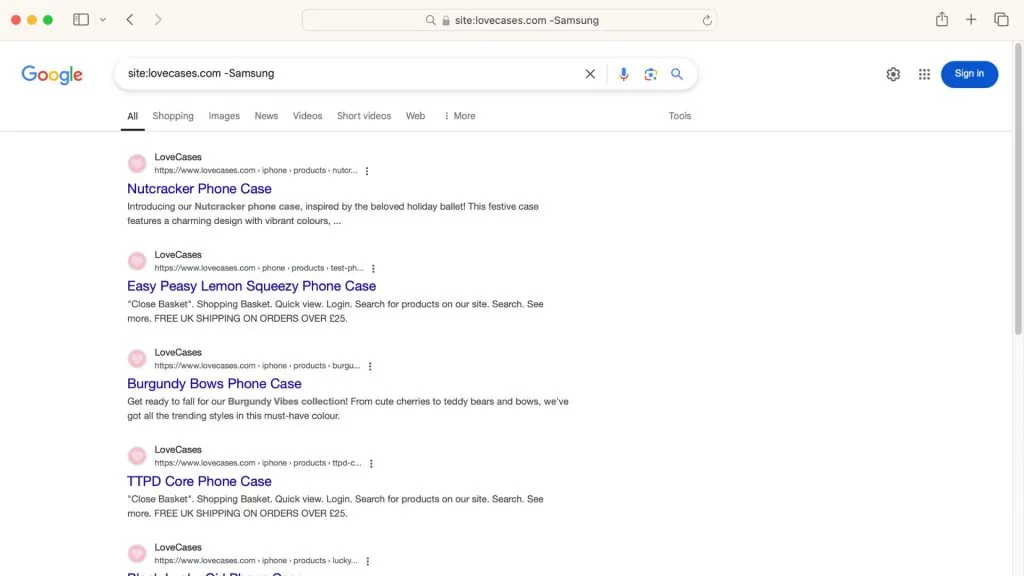
Example: site:lovecases.com -Samsung
Purpose: Removes results that contain a specific word.
Why It’s Useful: Filters out irrelevant words and content by using - in front of the keyword. For example, if lovecases.com focuses on Apple accessories, a marketer could use this to exclude Samsung-related pages from search results, making audits more precise. Or perhaps they would like to exclude blog content, using -blog, from filtered results - useful for identifying a site’s primary eCommerce content that’s separate from informational pages.
intext: find specific text on pages
Example: site:lovecases.com intext:“free shipping”
Purpose: Searches for specific words or phrases within a webpage’s text.
Why It’s Useful: This is useful for auditing promotional messaging across the site, such as uses of ‘free shipping’ within content. This can help users ensure consistent brand messaging or track where specific offers are mentioned.
allinanchor: analyse backlinks with specific anchor text
Example: allinanchor:“buy phone case”
Purpose: Finds backlinks using a specific anchor text.
Why It’s Useful: Helps check which sites are linking to lovecases.com using specific anchor text. For example, using the operator allinachor:, followed by ‘buy phone case’ will find backlinks using this specific text from other sites. Understanding backlink anchor text distribution is crucial for refining link-building strategies.
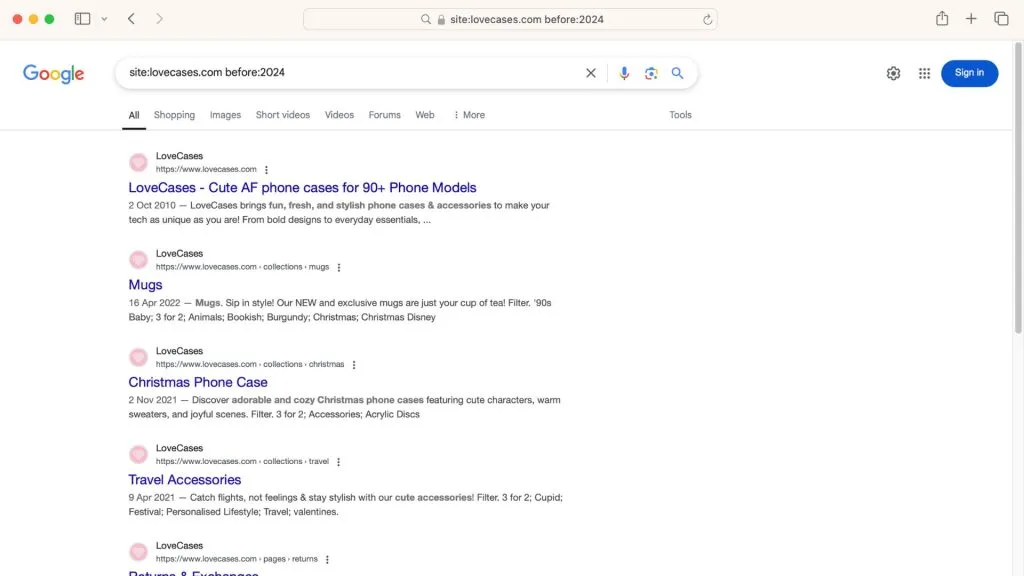
before: and after: before and after date range filters
Example: site:lovecases.com before:2023
Purpose: Limits search results to pages published or indexed before or after specific dates.
Why It’s Useful: Marketers can check for outdated content that may need updates or revisions. For example, older product pages or blog posts from past years might need optimisation to keep up with current SEO and customer interests. This can help content become relevant again and help boost them in search results.
Why use Google advanced search operators in eCommerce?
Google Advanced Search Operators are a secret weapon for eCommerce business owners and marketers looking to improve SEO, analyse competition, and optimise Shopify stores. By making use of the above operators, you can gain even deeper insights into site performance, content visibility, and industry trends… all without needing expensive tools.
After using Google Search Operators, why not make use of our other blog information to improve your eCommerce site? We have top SEO advice on How to create great eCommerce category meta titles for PLPs and How to optimise your eCommerce category meta descriptions, as well as Internal linking in eCommerce and why it’s important.
Alternatively, for more information about our eCommerce development services and SEO assistance, get in touch with us at magic42.